 By
By The boundary between workspace and living space has shifted permanently. Millions of professionals now work from home, finding themselves tasked with creating an environment that supports focus, reduces physical strain, and remains inviting throughout long workweeks. Designing a home office is not merely an exercise in aesthetics, nor is it purely about utility. It requires balancing ergonomic science, psychological principles of productivity, and personal comfort.
When designed thoughtfully, a home workspace serves as a dedicated sanctuary for quiet focus, creative brainstorming, and professional communication. Conversely, a poorly planned office can contribute to chronic fatigue, muscle stiffness, burnout, and frequent distraction. Transforming a home office into a high-performance space involves precise choices in furniture selection, lighting design, spatial layout, color psychology, and sensory regulation.
Spatial Planning and Ergonomic Fundamentals
Before purchasing furniture or selecting paint colors, establishing the structural layout of the home office is critical. Spatial design dictates physical movement, access to natural light, and the psychological separation between work life and home life.
Desk Positioning and Spatial Flow
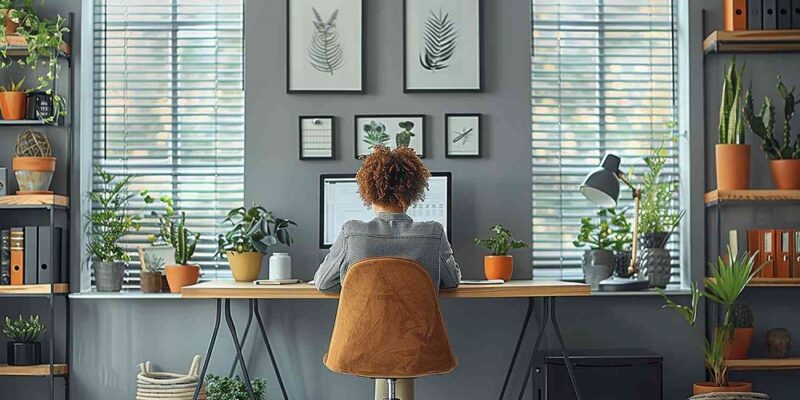
Where you place your desk sets the tone for the room. Placing a desk directly facing a blank wall can induce mental fatigue and a sense of confinement. Positioning the desk facing toward a window or looking toward the door—often referred to in design theory as the command position—promotes a feeling of control, openness, and calm.
If facing a window creates excessive visual distraction or harsh eye glare, place the desk perpendicular to the light source. This arrangement allows natural light to illuminate your surface from the side without causing direct reflection on monitor screens. Ensure there is at least three feet of open space behind your office chair to allow for easy entry, exit, and subtle shifts in sitting posture throughout the day.
Ergonomic Seating and Desk Heights
Ergonomics forms the non-negotiable baseline of a comfortable workspace. Prolonged sitting in a non-supportive chair leads to lumbar strain, poor neck posture, and decreased vascular circulation, all of which directly undermine mental focus.
When selecting an office chair, prioritize adjustability over visual trends. Look for models offering:
-
Adjustable lumbar support that conforms to the natural curve of your lower spine
-
Armrests that adjust in height and width to keep shoulders relaxed
-
Pneumatic height controls so your feet rest flat on the floor with knees angled at roughly 90 degrees
-
Breathable mesh or premium fabric upholstery that regulates temperature
Your desk surface should sit at a height that allows your elbows to bend at 90 to 100 degrees while typing, keeping wrists flat rather than bent upward. Sit-to-stand desks are highly effective for introducing movement into the workday. Alternating between sitting and standing every 30 to 60 minutes stimulates blood flow, increases energy levels, and reduces spinal compression.
Optimizing Lighting and Visual Ergonomics
Lighting plays a direct role in alertness, circadian rhythm alignment, and eye comfort. Combining multiple light sources creates a dynamic visual environment that adapts to different tasks and changing daylight levels.
Harnessing Natural Daylight
Natural light improves mood, energy levels, and cognitive output. Position your core workstation to maximize daylight exposure without incurring direct, unshielded sunshine during peak hours. Use sheer shades, adjustable wooden blinds, or solar filtering window treatments to diffuse bright sunlight into a soft, ambient glow.
Layering Artificial Light
A single overhead room fixture is rarely sufficient for dedicated desk work. It creates uneven shadows and bright spots that force your eyes to adjust constantly, causing ocular fatigue and tension headaches. Implement a three-tiered lighting approach instead:
-
Ambient Lighting: Overhead lights, flush mounts, or indirect floor lamps that evenly illuminate the overall room.
-
Task Lighting: Adjustable desk lamps or warm LED light bars mounted under shelving that cast focused illumination directly onto documents and reading materials.
-
Accent Lighting: Warm, decorative lights, such as wall sconces or LED backlighting behind monitors, which reduce the visual contrast between a bright screen and a dark backdrop.
Opt for bulbs with a color temperature around 4000 Kelvin during core working hours to promote mental alertness. Switch to warmer tones around 2700 Kelvin in the late afternoon to support a natural wind-down transition.
Color Psychology and Texture Selection
Color impacts emotion, focus, and energy retention. Selecting the right color palette transforms the atmosphere of an office from sterile or chaos-inducing into a controlled, serene environment.
Paint Palettes for High Focus
Bold, ultra-saturated colors like neon orange or bright red overstimulate the nervous system and induce subtle restlessness during prolonged focus sessions. Neutral and cool tones, by contrast, lower heart rates and encourage sustained attention.
-
Sage and Forest Greens: Green is widely associated with balance, restful visual processing, and nature. It reduces visual strain and fosters long-term mental endurance.
-
Muted Blues and Slate: Blue promotes structured thinking, calm communication, and logical processing, making it ideal for analytical roles.
-
Warm Earth Tones: Terracotta, warm beige, soft taupe, and creamy off-whites ground a space, making large or stark rooms feel soft and inviting.
Layering Textures to Combat Visual Monotony
A room filled exclusively with smooth plastic and metal surfaces feels clinical and cold. Incorporating natural textures adds tactile warmth and acoustic dampening, which makes spending eight hours in the room far more pleasant.
Integrate natural wood desk surfaces, woven wool rug pads, linen window drapes, and leather desk mats. These materials absorb ambient room echoes while providing subtle visual depth that calms the mind.
Acoustic Management and Clutter Reduction
Visual and auditory noise are significant triggers for workplace stress. An unorganized office cluttered with loose paper, tangled cables, and echo-prone surfaces taxes executive function and slows down daily output.
Sound Absorption Solutions
Hard surfaces like hardwood floors, bare drywall, and large uncurtained windows reflect sound waves, creating hollow echoes during video calls and magnifying background household noise. Mitigate acoustic reflection through structural additions:
-
Place a dense wool or high-pile area rug underneath the desk area
-
Hang thick fabric curtains over windows rather than relying solely on hard vinyl blinds
-
Install decorative acoustic felt wall panels or cork boards that absorb sound while doubling as display areas for ideas and schedules
Cable Management and Storage Architecture
Exposed, tangled power cords create visual chaos that subtly degrades mental clarity. Invest in under-desk cable management trays, velcro cord wraps, and sleek junction boxes to conceal power strips and chargers.
For physical documents and office supplies, adopt closed storage systems. Open shelves are excellent for select decorative items, plants, or curated books, but closed cabinets and drawers hide necessary daily clutter, keeping visual surfaces clean and calm.
Elevating Mood with Biophilic Design and Personal Accents
Biophilic design—the practice of incorporating natural elements into built environments—has proven benefits for stress reduction and mental clarity. Bringing nature indoors makes an office feel less like a prison of productivity and more like an inspiring retreat.
Selecting Indoor Plants
Plants improve indoor air quality by absorbing subtle off-gassing compounds while offering a restorative visual break. Select low-maintenance indoor species that thrive in varied light conditions:
-
Snake Plants and ZZ Plants: Highly resilient varieties that tolerate low light and irregular watering schedules.
-
Pothos and Philodendrons: Vining plants that cascade beautifully down high shelves or hanging wall planters.
-
Peace Lilies and Ferns: Excellent choices for adding rich green foliage while thriving in moderate indoor light levels.
Personalizing Without Distraction
Personal touches give an office identity and soul, but excessive decoration creates unnecessary clutter. Choose two or three meaningful pieces rather than filling every available surface. Framed fine art prints, architectural architectural models, or a handcrafted ceramic vessel keep the room elevated and sophisticated without overwhelming your line of sight.
Frequently Asked Questions
How can small home offices in apartments be decorated to look larger?
Utilize vertical wall space by installing tall, floating shelving units up to the ceiling rather than wide floor cabinets. Paint walls and trim in light, light-reflecting neutrals, and hang mirrors across from light sources to bounce natural light around the room. Choose furniture with thin metal legs or raised wooden frames to keep floor sightlines clear.
What is the most ideal window placement relative to a computer monitor?
The optimal placement for a computer monitor is perpendicular to windows. Placing a screen directly in front of a window causes extreme visual contrast and eye strain due to bright light behind the screen. Placing a monitor directly opposite a window causes harsh screen glare and reflections. Perpendicular alignment allows side light that minimizes both issues.
How do rug choices impact home office functionality?
Rugs provide critical sound dampening, floor protection, and thermal insulation. Select a low-pile or flat-weave rug for the area directly underneath an office chair so that castor wheels can glide smoothly without catching or bunching up the fabric. If using a high-pile or shag rug, place a rigid glass or heavy polycarbonate chair mat on top of the rug underneath the seating zone.
What is the best way to handle open shelving clutter in an office space?
Maintain an intentional ratio of empty space to stored objects on open shelves, aiming for roughly 30 percent open space. Group smaller supplies inside matching opaque storage boxes or woven baskets placed on lower shelves. Reserve eye-level shelves for curated books, art prints, and potted plants to keep the visual effect tidy and intentional.
How can a home office be designed for dual purposing, such as a guest room?
Focus on multi-functional, convertible furniture pieces. Utilize a high-quality daybed or hidden Murphy bed with integrated side shelving instead of a traditional permanent bed frame. Select a streamlined, elegant desk that doubles as a vanity or nightstand when guests stay over, and store personal work documents inside locked, portable storage bins that can be neatly hidden inside a closet.
Are standing desks worth incorporating into a decorative office scheme?
Yes, standing desks significantly support ergonomic health by breaking up long periods of sedentary posture. To ensure a standing desk aligns with your decor style, look for frames featuring concealed motor mechanisms and pair them with solid wood desktop tops such as walnut, oak, or maple rather than basic industrial laminate options.
What small design changes provide the fastest improvement in focus?
The fastest improvements come from eliminating physical and visual distractions. Implementing simple cable management to clear your desk surface immediately calms visual fatigue. Swapping harsh overhead lighting for a dedicated, warm-toned desk lamp and adding a single healthy green plant to your main field of view will instantly elevate both focus and physical comfort.